





-
 Google Could Use AI to Extend Search Monopoly, DOJ Says as Trial Begins22 April 2025
 -
Google Pixel Production Could Shift From Vietnam to India as Company Seeks to Diversify Supply Chain22 April 2025
-
Google Teases AI Glasses in a Live Demo, Hints at Future Gemini Features21 April 2025
-
Google Settles India's Antitrust Probe in Android TV Case21 April 2025
-
Android 16 Beta 4 Update Reportedly Modifies Clock Font on Pixel Phones; AOD Clocks Get Dynamic Colour21 April 2025
- Home
- Tablets
- Tablets Reviews
- Google Nexus 10 review
Google Nexus 10 review
By Associated Press | Updated: 5 April 2013 18:25 IST
Advertisement
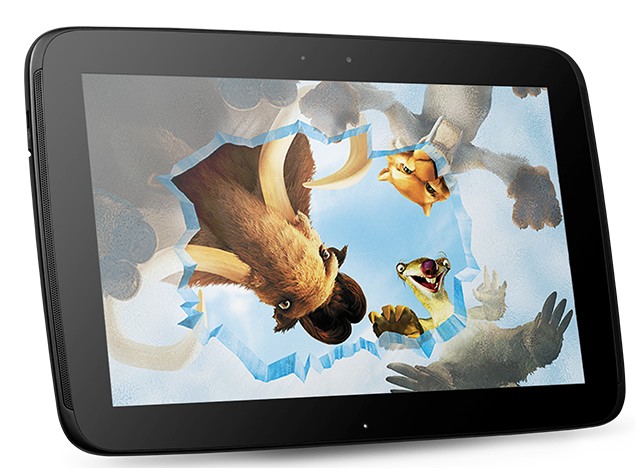
When I first turned on Google's new tablet computer, I immediately thought of it as a mere conduit to Google services.
Google Nexus 10 in pics
Besides giving you quick access to Gmail and YouTube, the Nexus 10 steers you to digital movies, books and other content available for sale through Google's online Play store.
Because of that, I wasn't thinking of the Nexus 10 as an alternative to Apple's general-purpose iPad - even with a price tag that's $100 cheaper, starting at $399. It took more thought and time with the Nexus to change that perception. After all, apps available for Android smartphones work on the tablet as well.
Still, the Nexus really shines when it comes to media - especially content bought through Google.
For the past year, Google has been trying to challenge Apple and Amazon by selling digital content.
The Play store is Google's version of iTunes for Apple devices. There, you can get a variety of apps, some free and some for a small fee. You can buy or rent movies and obtain books, magazines and music. Google isn't satisfied with building search engines and selling ads. It wants a bigger role in the digital economy.
Over the summer, Google came out with a 7-inch tablet called the Nexus 7. Just as Apple is making an iPad Mini that's about the size of the Nexus 7, Google is now selling a larger version of the Nexus, about the size of Apple's regular iPad. It starts shipping this week.
On the Nexus 10, icons at the bottom of the screen emphasize Google's media products available through Play. Click on a picture of film to watch movies, headphones to listen to music and a book to, well, read books. Another icon gets you to the Play store to obtain more content and apps.
The Nexus has a rubberized back and fits more snuggly on my lap than the metal-backed iPad. In my hands, I don't feel as if the Nexus would slip out and crash on to the hard floor, as I continually do with the iPad.
There are front-facing speakers going up and down both sides of the Nexus, compared with just one tucked in a corner on the back of an iPad. You feel more immersed watching video with sound coming right at you from the entire device. I hadn't considered that a problem on the iPad, but I began to notice it once I played video on the tablets side by side.
The screen measures 10.1 inches diagonally, which is more than the iPad's 9.7 inches. But the screen isn't any larger because while it's about an inch wider in horizontal mode, it's also about a half-inch less in height. This works well for widescreen content, which completely fills the screen. On the iPad, the latest movies and TV shows often have black bars, no matter how you hold the tablet. In some cases, you might see the sides of video cut off to fit the space, as I did watching this week's episode of "Revenge" on Hulu. Again, I hadn't considered that a problem on the iPad, until I began to notice it.
What makes the tablet's shape good for movies makes it less-than-ideal for magazines, though. There's wasted space on the top and the bottom for magazines on the Nexus. But I watch TV shows and movies online more often than I read magazines digitally, so I'll let it slide.
As for books, text on the Nexus' screen comes out sharp. News sites and apps also look nice. The Nexus has a screen resolution of 300 pixels per inches, slightly better than the 264 ppi for the latest full-size iPad (which itself is far better than the 132 ppi on the older iPad 2 model still available).
True, there are other tablets designed as media players, too. Amazon.com Inc.'s Kindle Fire and Barnes and Noble Inc.'s Nook HD come to mind, and both have larger versions out this month. But neither has the diversity of apps available for the Nexus and other full-fledge Android devices (The Kindle and the Nook run on modified versions of Android and restrict apps to what's available through their own online stores).
So what does that mean?
Apps on my Samsung Galaxy S III smartphone automatically appear on the Nexus 10 after signing in with the same Google account. I'll note that the Nexus 10 is also made by Samsung Electronics Co., even though it's branded Google.
Three of my apps, for AccuWeather, Citibank and Dunkin' Donuts, aren't compatible for unknown reasons. But those I use most often - Facebook, Instagram, Foursquare and a slew of other weather apps - all work on the Nexus. The companion app for the TV show "Dexter" also works, allowing me to play trivia games and watch video clips.
Not all apps have been specifically adapted for the tablet's larger screen, but they take advantage of the entire screen, nonetheless, thanks to the way Android lets software programmers build their apps in modules. All the content gets blown up and still looks decent.
Apple's store has a far wider selection of apps, though, including a half-dozen apps for exhibits at the American Museum of Natural History in New York. A search on Play comes up with only one.
The Nexus comes with the latest version of the Android operating system, version 4.2. It introduces a new feature for sharing tablets, the way family members can share Windows and Mac computers while keeping personalized settings. You no longer have to fight with a kid who constantly changes the volume or moves apps around. Now, just sign in as separate users.
The Nexus is a tad lighter, while the iPad promises longer battery life and has an option for cellular broadband for $130 more, plus the cost of data plans. Neither has a slot to expand memory with SD cards. Both have two cameras - 5 megapixels on the back for taking photos and video, and a lower-resolution one on the front for videoconferencing.
The iPad remains king among tablets, with its ease of use, variety of apps and dominance in the market. But challengers such as Google offer choice. The Nexus 10 is a good choice if you already have an Android phone and use a lot of Google services. That's especially true if you also watch a lot of movies and TV shows, but don't want to be limited to that.
Google Nexus 10 in pics
Comments
For the latest tech news and reviews, follow Gadgets 360 on X, Facebook, WhatsApp, Threads and Google News. For the latest videos on gadgets and tech, subscribe to our YouTube channel. If you want to know everything about top influencers, follow our in-house Who'sThat360 on Instagram and YouTube.
Further reading:
Google, Google Nexus, Google Nexus 10, Google Nexus 10 review, Nexus, Nexus 10, Nexus 10 review
Related Stories

Advertisement

Follow Us

-

04:49
JisuLife Hand Fans, Neck Fans & Portable Fans: First Impressions -
01:14
Gadgets 360 With Technical Guruji: Tech Tip to Save iPhone Storage -
03:21
Gadgets 360 With Technical Guruji: Realme P3 Series Debuts -
01:32
Gadgets 360 With Technical Guruji: News of the Week [April 20, 2025] -
03:13
Gadgets 360 With Technical Guruji: Ask TG [April 20, 2025]
Advertisement
Popular on Gadgets
- Samsung Galaxy Unpacked 2025
- ChatGPT
- Redmi Note 14 Pro+
- iPhone 16
- Apple Vision Pro
- Oneplus 12
- OnePlus Nord CE 3 Lite 5G
- iPhone 13
- Xiaomi 14 Pro
- Oppo Find N3
- Tecno Spark Go (2023)
- Realme V30
- Best Phones Under 25000
- Samsung Galaxy S24 Series
- Cryptocurrency
- iQoo 12
- Samsung Galaxy S24 Ultra
- Giottus
- Samsung Galaxy Z Flip 5
- Apple 'Scary Fast'
- Housefull 5
- GoPro Hero 12 Black Review
- Invincible Season 2
- JioGlass
- HD Ready TV
- Laptop Under 50000
- Smartwatch Under 10000
- Latest Mobile Phones
- Compare Phones
Latest Gadgets
- Huawei Enjoy 80
- Oppo K12s
- Honor X60 GT
- Vivo T4 5G
- Vivo X200 Ultra
- Vivo X200s
- Oppo K13 5G
- Infinix Note 50s 5G+
- Asus Vivobook S14 Flip (2025, Intel Core i5)
- Asus Vivobook S14 (2025, Intel Core i5)
- Vivo Pad SE
- Vivo Pad 5 Pro
- Vivo Watch 5
- Redmi Watch Move
- Xiaomi X Pro QLED 2025 (43-Inch)
- Xiaomi X Pro QLED 2025 (55-Inch)
- Nintendo Switch 2
- Sony PlayStation 5 Pro
- Toshiba 1.8 Ton 5 Star Inverter Split AC (RAS-24TKCV5G-INZ / RAS-24TACV5G-INZ)
- Toshiba 1.5 Ton 5 Star Inverter Split AC (RAS-18PKCV2G-IN / RAS-18PACV2G-IN)

- About Us
- Sitemaps
- Feedback
- Archives
- Contact Us
- RSS
- Advertise
- Career
- Privacy Policy
- Ethics
- Editorial Policy
- Terms & Conditions
- Complaint Redressal
Download Our Apps
Available in Hindi
© Copyright Red Pixels Ventures Limited 2025. All rights reserved.


